Table of Contents
1. Leave & accruals – more flexible, fewer errors
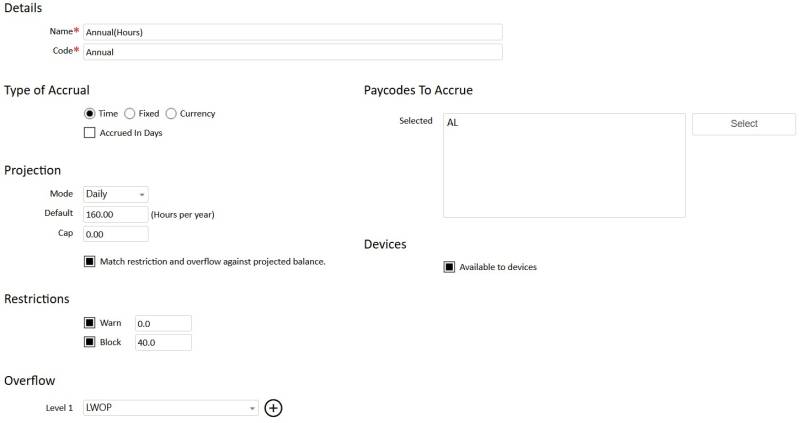
We’ve made extensive improvements to how leave and accrual balances work, especially when balances go negative or need to spill into other pay codes.
What’s changed for you -
Better control over negative balances
Sites can define more flexible rules around whether and how employees are allowed to go into negative leave.
Requests that should be blocked because of insufficient balance now respect “block” settings correctly right from the start.
Consistent behaviour in all leave tools.
The Time Off Acceptance dialog, Time Off page, Absent dialog, and exception flows have been updated so they all understand the new overflow rules.
Approvals now correctly split and record absences when they cross balance limits.
Bulk and multi‑day adjustments now save reliably and correctly generate all underlying transactions.
When multi‑day absences are changed, accrual balances are immediately recalculated, so the figures shown on screen are accurate.
Customer benefit:
- Far fewer failed or confusing leave transactions.
- More accurate balances for multi‑day and complex absences.
- Clear, predictable behaviour when staff exhaust an entitlement or go into negative balance.
2. Forgotten password reset – easier for users, safer for sites
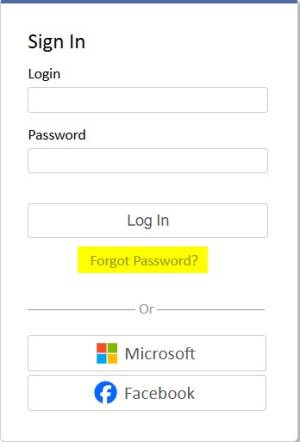
We’ve improved the forgotten password reset experience to make it more reliable and user‑friendly, while keeping security controls in place.
** NOTE: ** The password reset process requires that the user has a valid email address.
What’s changed for you:
- More reliable reset flow
- Users who forget their password now have a smoother reset process, with clearer handling of expired or invalid reset links.
- The flow is designed to minimise “stuck on an error screen” scenarios and reduce support calls.
- Behaviour has been aligned with our broader security settings (such as password rules and lock‑out settings).
Customer benefit:
- Fewer help‑desk requests about login problems.
- A clearer, more predictable way for staff to regain access if they forget their password.
- Stronger alignment with site‑wide security policies.
3. Notifications – support for multiple apps and cleaner device tracking
We’ve reworked how push notifications are managed in mobile apps.
What’s changed for you:
- The system now supports notifications for different app types in Android (mybiotime) and IOS (biotime APP and mybiotime).
Customer benefit:
- More reliable push notifications across different apps.
- Easier troubleshooting when someone isn’t receiving notifications.
- A solid foundation for future app variations without re‑work.
4. Everyday usability – faster, clearer admin workflows
4.1 Employee creation
New employee workflow
The old “New Employees” dialog mixed partially created employees with the option to create a brand‑new profile.
This has been split into:
- Finish Enroll – open a list of incomplete employee setups to resume.
- New Employee - jump straight into a clean, new employee profile page.

This avoids confusion where there are many half‑created employees.
4.2 Configurable display name format
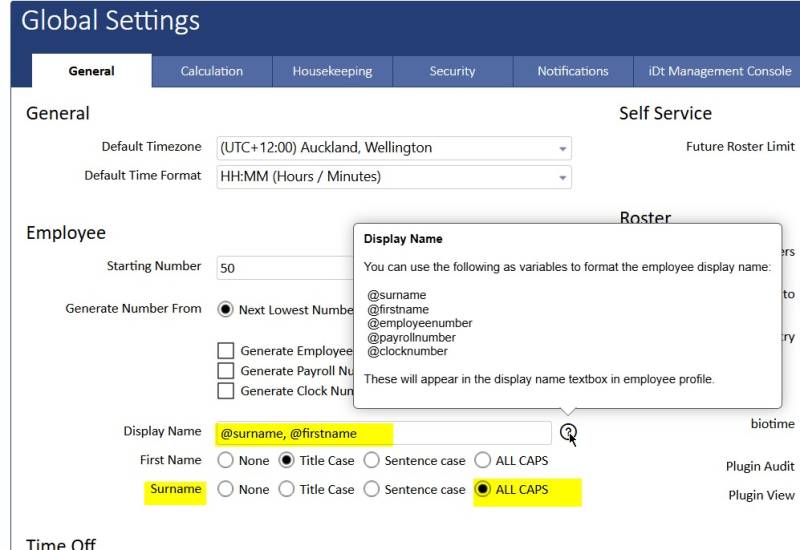
Sites can now define a global default format for employee display names.
The format is configured using a simple expression (for example, SURNAME in capitals then first name, or a fully customised phrase).
This default is applied when new employees are created, avoiding repetitive manual editing.
4.3 User defaults & options
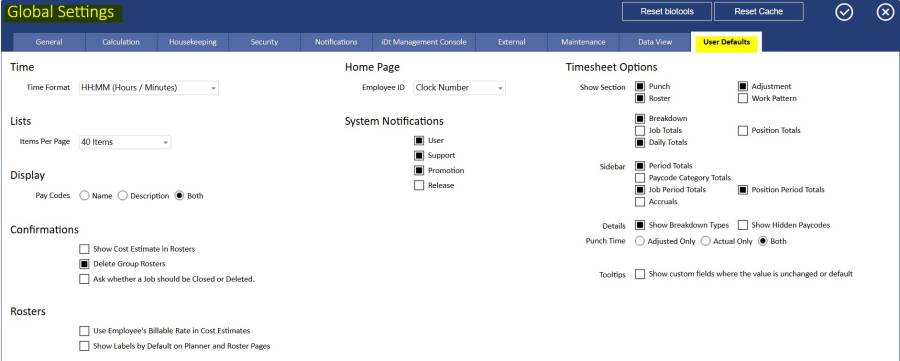
User Defaults in Global Settings
A new “User Defaults” tab allows administrators to define:
- Default User Settings
- Default Timesheet Options
These defaults are applied whenever a new user is created.
Values are based on the previous hard‑coded defaults but are now site‑configurable.
4.4 List screens
Total counts on list screens
All major list screens (employees, timesheets, availability, time off, accruals, rosters, and key configuration lists) now show:
- The range of items on the current page (e.g. “1–50”)
- The total number of items (e.g. “/374”)
This makes it much easier to understand list sizes and where you are when paging.

4.5 Report presets renamed to favourites
Everywhere in reporting, “Presets” have been renamed to “Favourites”:
- Main and sub‑menus
- Report dialogs
This label better reflects their actual use: saved report setups that users prefer and re‑use.
Customer benefit
- Less confusion when creating or finishing employee records.
- Consistent naming and user defaults across the organisation.
- Easier navigation of large data sets and more intuitive report terminology.
5. Employee documents
We’ve improved how you track and report on important employee documents.
What’s changed for you
- When you upload a document to an employee’s profile, you can now add an expiry date (or leave it with no expiry).
- The Documents panel on the dashboard now shows:
- All documents with no expiry, and
- Documents whose expiry date has not yet passed.
Reporting on document expiry
The “Profile Files by Employee” report now includes the Expiry date for each document.
This allows straightforward reporting on which documents are current and which are nearing expiry.
Customer benefit
- Easier tracking for licences, qualifications, visas, etc.
- Better visibility of which documents are current across the site.
6. Security, roles and reliability
Several changes strengthen security and improve system robustness.
Role‑based visibility of custom fields
List configuration (the “three stripes” menu) now respects Role Custom Field Restrictions:
- If a role is configured to exclude custom fields from various screens, those fields also no longer appear in the list of “available columns” for that user.
This prevents restricted data being exposed through custom list layouts.
Converter and pay export defaults
User records can now include default converter and default pay export preset options.
These respect:
- Security role permissions, and
- Any user restrictions defined in the presets themselves.
- If a user doesn’t have the required permission for a configured default, the screen will simply revert to a standard “select” dropdown.
Device staging controls
When staging devices, “Send Stage Info” now behaves as follows:
- If you select one or more employees, the message is sent only to them.
- If you don’t select anyone, it is sent to all employees with active staging keys (as before).
Back‑end data has also been extended so it’s possible to track the last staged device and the time it was staged for single‑user devices.
Overall value of v1.30
Across this sprint, customers gain:
- Much stronger and more flexible leave/accrual handling
- A smoother, safer forgotten‑password reset experience
- Future‑proof notification infrastructure for multiple apps
- Smoother admin and user workflows
- Improved compliance and security